Nothing disappears between chats
Every topic gets a number, a status and a place in the queue until it is closed.

Clienta customer tickets
Every request gets a number. The team answers from one inbox.
If you have spent a day in support or post-sale follow-up, you know requests without a system turn into noise. The customer writes on WhatsApp, comments on Instagram, then calls to ask why nobody answered. The thread sits with one person and nobody knows if it is closed.
Clienta ticketing turns each request into a numbered ticket. Customers use your branded portal — mobile number and a one-time code, no email account. The team replies from a shared inbox, and the request stays on the same record as the person, deal and project.
What is a ticketing system?
A ticketing system manages questions, complaints and post-sale follow-up. Each message becomes a ticket so you can see when it arrived, who owns it, how urgent it is and what the last reply was. In Clienta that queue lives in the same CRM the sales team uses — not a separate panel that rebuilds customer context from scratch.
Every topic gets a number, a status and a place in the queue until it is closed.
They open the same portal instead of calling again to ask where things stand.
When a customer asks about their work, the ticket sits beside the deal and project.
Clienta ticketing features
Customers sign in with a mobile number. No mandatory email account — the login they already use every day.
Set the brand name, welcome message, accent color and portal address so support looks like your business.
Embed the same portal on your website. Customers still sign in with SMS, not a separate account.
Create categories such as sales, support or billing so the right queue gets the right request.
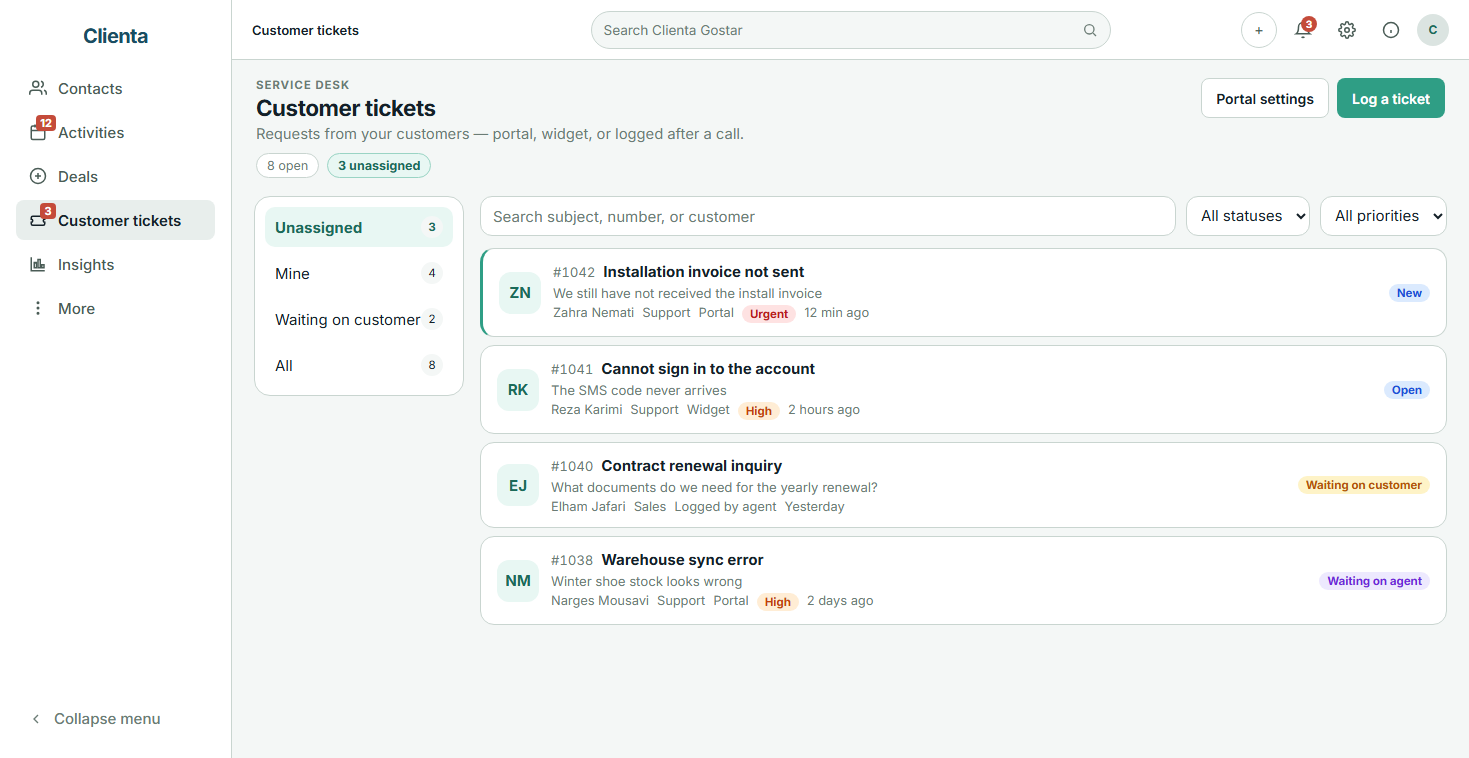
See new, unassigned, mine and waiting-on-customer tickets. Search by subject, number or customer name.
From new and open to waiting, resolved and closed. Low to urgent so a rush item is not buried.
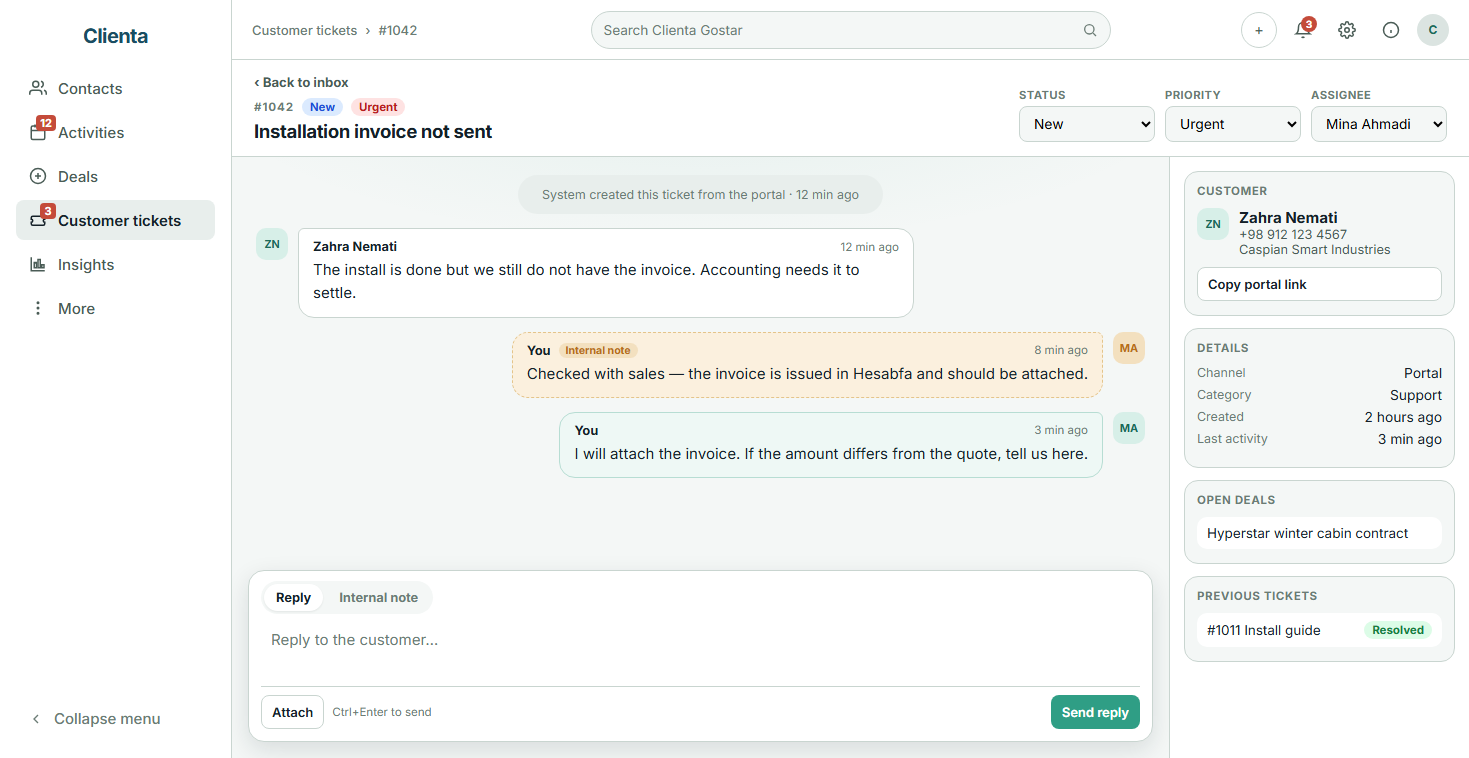
The team talks privately. Public replies go to the customer; notes stay inside the workspace.
Attach a screenshot, invoice or install file so a vague description does not stall the work.
A ticket connects to the person, organization, deal and project. Previous tickets and open deals are in view.
If the customer phoned, the agent creates the ticket in the workspace so a verbal promise is not lost.
With customer SMS on, a public reply notifies the customer to open the portal.
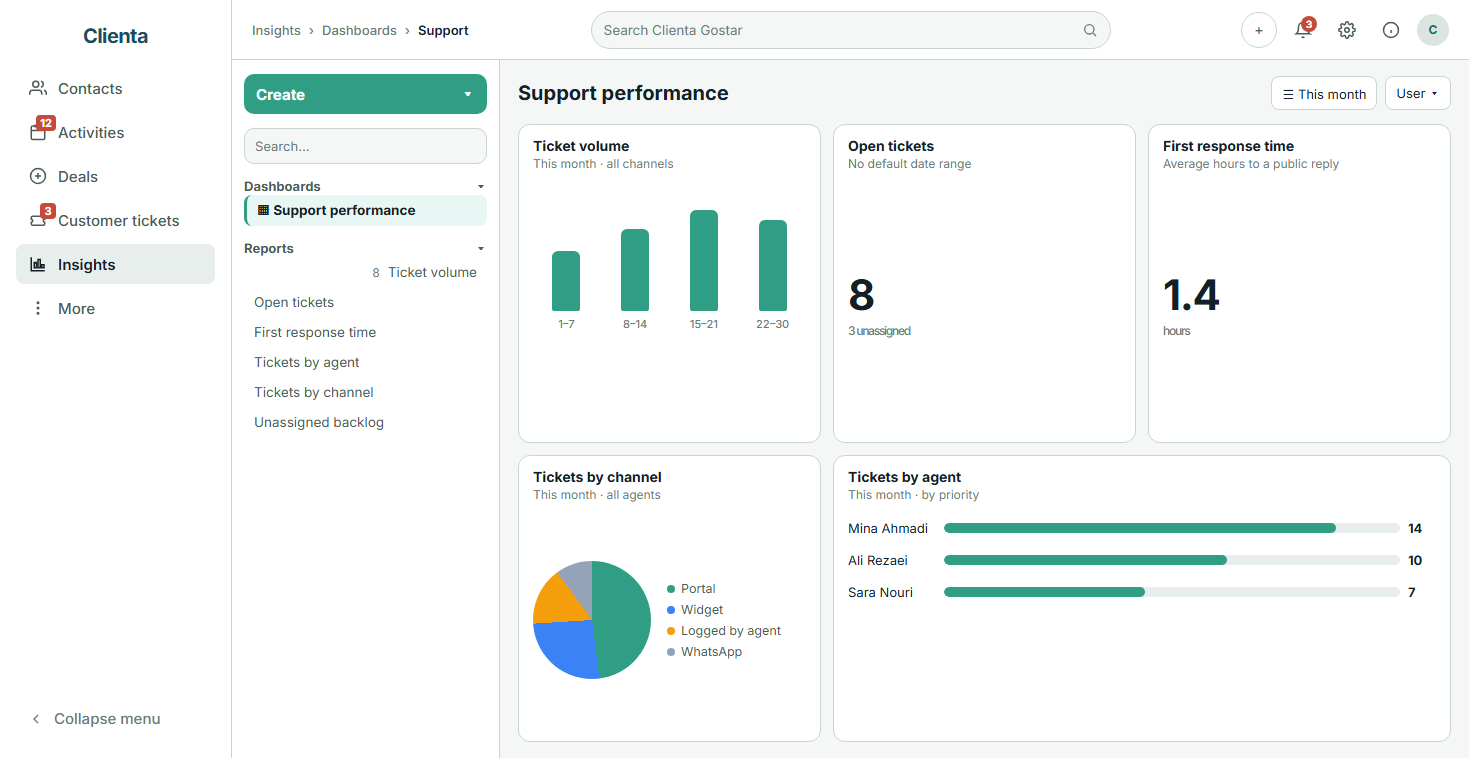
Ticket volume, first response time, resolution time, open tickets, unassigned backlog and load per agent in Insights.
What matters in a CRM ticketing system
If the ticket is not linked to the customer and the deal, the agent does not know what was sold and sales does not know what support promised. A good tool orders the queue and keeps the context.
Email sign-up is friction for many buyers. Mobile and a one-time code means the portal gets used.
It should be obvious what is unassigned, what is yours and what is waiting on the customer.
The agent should see the person, open deals and earlier tickets so answers do not conflict.
Not every request starts on the website. A promise made on the phone should become a ticket the same day.
First response time and open volume show where the team is stuck — before the next angry call.
Product capability
Customers should not feel they stepped into a stranger’s software. In Clienta you set the brand name, welcome message, color and portal address, copy the link, and embed the widget if you want it on your site.
Product capability
A request in a private chat is visible to one person. The Clienta inbox splits unassigned, mine, waiting-on-customer and all tickets. Open and unassigned counts sit on the same page.
From the customer message to a closed ticket
Turn on the portal with your brand, share the link or embed the widget. From then on every request lands in the same queue the team opens every day.
They enter with a mobile number and SMS code, pick a category, write the subject and details, and attach a file if needed.
It appears in Unassigned. An agent takes it, sets priority, and picks the right contact if several people share the number.
Open deals, previous tickets and internal notes are on the record. The public reply goes to the portal; SMS can notify the customer.
Status moves to resolved or closed. If the customer writes again, the ticket reopens. History stays on the customer record.
Product capability
The agent should not have to ask what this customer bought. The ticket record holds the two-way thread, internal notes, attachments, assignee, and the person, open deals, previous tickets and similar open tickets.
Product capability
“It felt busy today” is not enough to run support. Once customer tickets are added to the workspace, Insights shows volume, open tickets, unassigned backlog, first response time, resolution time and load per agent.
One ticket, three angles
What is still unassigned, what has this customer said before, and where do I write so the rest of the team can see it?
After the sale, what is still open for this customer — and does support’s answer match what I promised?
How far is the queue behind, how long is first response, and which topic keeps coming back?
Frequently asked questions
A tool for managing customer requests, questions and problems. Each message becomes a numbered ticket so follow-up is traceable — instead of disappearing across WhatsApp, Instagram and phone calls.
You turn on the portal with your brand, color and address. The customer signs in with mobile and a one-time code — or uses the site widget, or an agent logs the request after a call. The ticket lands in the team inbox, gets assigned, and the whole thread stays on that record.
Yes. A ticket links to the person, organization, deal and project, and also appears on the customer record. Agents see open deals and previous tickets; sales can see which request is still open.
With a mobile number and an SMS code. They do not create an email account. The number is used to find their own requests.
Customer tickets are included from the Premium plan. Lite and Growth can add them from the marketplace. See the pricing page for tariffs. You also get a 14-day free trial.
A service-level agreement with a mandatory deadline per ticket is not defined yet. Instead, Insights shows first response time, resolution time, open tickets and unassigned backlog so you can manage the team with numbers.
Yes. Once the tickets app is added to the workspace, Insights includes volume, tickets by agent, first response time, resolution time, resolution rate and stale open tickets.
Categories help the customer send the request to the right place. On the ticket record, similar open tickets for the same customer are visible so two agents do not answer twice. There is no separate customer FAQ knowledge base in the product today.
Start free for 14 days, turn on the portal with your brand, and run one real request through to a reply in the inbox.