ClientaSepidar System

Sales in Clienta · Official documents in Sepidar

CRM for companies that already run Sepidar

Sepidar CRM

Run sales in Clienta. Keep accounting in Sepidar.

Sepidar is strong at accounting, inventory and official invoices. What is usually missing is the sales layer: where the lead came from, which stage the deal is in, who to call today, and whether the salesperson can see credit and stock without phoning finance.

Clienta is a Sepidar CRM in the practical sense: it runs pipeline and follow-up in the cloud, then uses the marketplace connector so catalog, parties, balances and invoices reach the on-premises Sepidar install. The point is not to replace the general ledger — it is to enter sales once and post the document in finance.

  • Sepidar app in the marketplace is free
  • Salespeople stay out of Sepidar
  • Sepidar CRM web-service lock is required
Clienta pipeline: the CRM layer before a Sepidar document is posted

Two systems, one flow

Sepidar is accounting. CRM is selling.

Almost every Iranian business that runs Sepidar keeps sales somewhere else: Excel, WhatsApp, a salesperson’s memory or a separate CRM. The pain starts when those worlds are not connected. Clienta organises selling and sends the same data to Sepidar for the official document.

In Clienta

Customer relationships and sales

Leads, people, companies, activities, the deal pipeline, quotes and sales invoices live here. A salesperson works the day without a Sepidar licence.

  • Pipeline with the next action on the card
  • Customer record with calls, notes and deals
  • Quotes and invoices on the same opportunity
  • Mobile apps on the same web account

In Sepidar

Accounting, stock and the official document

List prices, warehouse quantity, credit limits, parties and tax invoices stay the source of truth. Finance owns the document. Clienta does not become the ledger.

  • Sellable items sync from Sepidar
  • Balance and credit appear on the customer
  • Issued invoices become Sepidar documents
  • Official invoices lock in CRM after send

The pain everyone recognises

If you have Sepidar and still no CRM, these five signs are familiar.

Sepidar’s own CRM-integration pages list the same symptoms for Iranian companies. They are not slogans. They are the daily calls between sales and finance.

Customer data in sales and finance does not match

Name, phone, national ID or economic code in the sales spreadsheet differs from the Sepidar party. When the invoice arrives, finance retypes it or the document fails.

Sales has to call finance for a balance

Without live credit, a salesperson closes a credit deal and finance objects later — or they log into Sepidar and risk the document.

The sale is done; the official invoice is late

The quote sits in Word, the message in WhatsApp, and finance re-enters it in Sepidar tomorrow. The customer wants the document today.

Double entry wastes time and creates errors

Item code, quantity, discount and sale type are typed twice. One digit off means stock mismatch, conflicting reports and a bounce back to sales.

Sales reports do not match finance reports

Management sees pipeline in CRM or Excel and collections in Sepidar. Two conflicting numbers mean a meeting that cannot decide.

What a Sepidar CRM has to deliver

Clienta completes the sales layer. It does not rebuild accounting.

Pipeline before the invoice

Leads and deals stay in Clienta. When an opportunity is won, the invoice is built from those lines — the path does not disappear into a spreadsheet.

Balance and credit on the record

Sales sees Sepidar credit and outstanding balance in Clienta. They do not message finance before closing a credit deal.

Stock from the Sepidar warehouse

Items come from the accounting catalog. Quantity is the default warehouse. Selling on a paper number or a free-hand price stops.

Official invoices with a clear role

Sales can raise a quote. Sending the official invoice can stay with the workspace admin. A tax document is not a team-wide button.

Salespeople do not get Sepidar

You do not buy ten Sepidar licences or risk document edits. Selling stays in CRM. Finance keeps Sepidar.

Mobile on the same flow

Android and iOS use the same workspace. With Sepidar connected, field sales works from the real catalog.

Sales pipeline

See deal status instead of asking finance where the sale went.

Sepidar shows posted invoices. It does not show a pipeline, overdue follow-ups or stage value. Clienta is the board for work that has not become an official document yet.

  • Stages that match your process
  • Deal cards with value, owner and next action
  • Turn a won opportunity into an invoice, not an Excel copy
Clienta pipeline: daily selling before Sepidar

Quotes and invoices

From opportunity to document without retyping.

Build a quote on the deal, send it to the customer, then issue the sales invoice. With Sepidar connected, that issued document goes to accounting.

  • Quotes and invoices on the customer record
  • Lines from synced Sepidar items
  • Official invoices lock in CRM after they are sent
Clienta invoices: the same document that can register in Sepidar

Customer record

Keep financial balance next to sales history, not in another window.

Calls, meetings, notes and deals stay on the Clienta record. With Sepidar connected, credit and outstanding balance sit on the same customer so negotiation uses real numbers.

  • Interaction timeline in CRM
  • Sepidar parties map to a person or company
  • Credit-limit warning before an invoice is posted
Clienta deal record: sales context before posting to Sepidar

Marketplace

Sepidar is a workspace app — install it, do not commission a custom project.

The Sepidar connector is free in the Clienta marketplace. An admin adds it, runs the Windows agent on the accounting PC and syncs items. Salespeople only see the result on invoices and records.

  • Add Sepidar to the workspace in one admin click
  • Outbound agent instead of opening a port to the internet
  • Sync items and set default sale type, warehouse and currency
Clienta marketplace: Sepidar beside SMS, Hesabfa and WordPress

Mobile

Field sales should use the same Sepidar catalog.

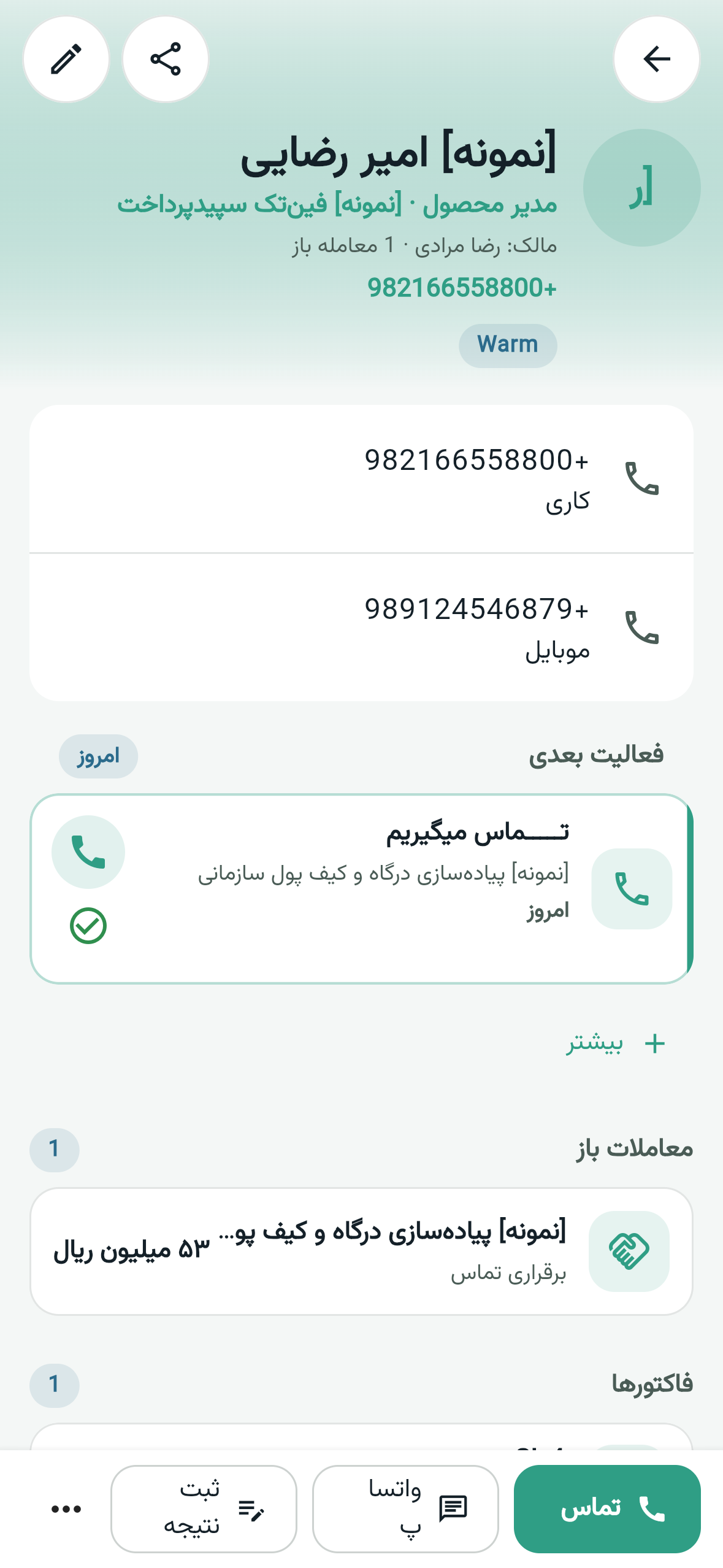
The Android and iOS apps are the same workspace. A salesperson on the road sees the customer and the deal and can call — they do not go back to the office for stock or wait for a photo of an invoice.

  • Today’s work, contacts and deals on the phone
  • The same account, no separate data
  • Invoices and products when plan and permissions allow
Clienta mobile app customer record for field sales at a Sepidar company
Clienta mobile: follow the customer outside the office

How the work flows

From lead to Sepidar document, one path

This is the cycle Sepidar companies want: sales decides in CRM, finance owns the document in Sepidar, and management sees one story from both.

  1. 1

    Leads and opportunities in Clienta

    A lead arrives from a form, a call or manual entry, gets qualified and becomes a pipeline deal. That stage does not exist in Sepidar — and should not.

  2. 2

    Quote with Sepidar items

    Lines come from the synced catalog. Price and stock come from accounting so the promise to the customer is real.

  3. 3

    Issue the invoice in CRM

    After approval, the sales invoice is issued. Drafts are not sent to Sepidar. Only issued documents are the finance bridge.

  4. 4

    Push to Sepidar

    An admin — or the role you configured — sends the invoice. Missing parties are created or linked. If credit would be exceeded, posting stops before a document is created.

  5. 5

    Finance keeps ownership

    Number and document live in Sepidar. The Clienta invoice locks. Voiding or correcting the official document happens in accounting, not by deleting a sales card.

The connection

Clienta is cloud. Sepidar is Windows on your site.

The Sepidar web service runs on the same Windows install, usually port 7373. Clienta cannot reach it from the public internet. A Windows agent on the accounting PC pulls work from the cloud and talks to localhost. You do not need a static IP or an open modem port.

Clienta cloud

Sales, invoices and the marketplace. Sepidar passwords stay on the Clienta server.

Windows agent

On the Sepidar PC. It connects outbound to the cloud. It does not expose the accounting port.

On-premises Sepidar

Server mode is on. Items, balances, credit and sales documents live here.

Sepidar cloud / web editions do not connect. The “Sepidar CRM web service” lock — or shop / mobile-ordering — must be active on the company’s dongle. Clienta does not sell that lock.

On the customer record

Sales sees the balance in CRM, not in Sepidar.

The Sepidar finance card sits on a person, company, product and invoice. The point is that a salesperson never enters the accounting app for stock or credit, and never edits the document.

Product boundary

A Sepidar CRM is a sales bridge, not a new ledger.

What Clienta does with Sepidar

  • Pulls sellable items from Sepidar into the Clienta catalog.
  • Links a person or company to a Sepidar party, or creates one.
  • Sends issued quotes and invoices to Sepidar.
  • Shows account remainder, credit limit and warehouse stock in CRM.
  • Lets you register a receipt on a synced invoice.

What we do not promise

  • It does not replace the ledger, payroll, purchasing, manufacturing or tax e-invoicing.
  • It does not create items in Sepidar from inside Clienta.
  • It does not edit or delete an official invoice in CRM after send.
  • It does not connect to Sepidar cloud — Windows install only.
  • Warehouse transfers, sales returns and distribution are not in this version.

By role

Sales, finance and management each keep their job.

Salesperson

Pipeline, follow-up and quotes live in Clienta. They see balance and stock and stay out of Sepidar. They do not wait on finance to print a quote.

Accountant / finance

The official document arrives from CRM with the right item and party codes. Sales does not have Sepidar. Turning a quote into an invoice can stay with an admin, because voiding a tax document has consequences.

Sales manager or CEO

Pipeline numbers are no longer a spreadsheet detached from Sepidar. You do not hand every seller a Sepidar licence, and sales versus collections become one story.

FAQ

Questions Sepidar companies ask before they pick a CRM

What is a Sepidar CRM?

Sepidar itself is accounting software, not a full CRM. People searching “Sepidar CRM” want a sales system that connects to Sepidar: leads, pipeline and follow-up in CRM, and items, balances and official invoices in Sepidar. Clienta is that sales layer and connects from the marketplace to an on-premises Sepidar install.

Does Clienta replace Sepidar?

No. Clienta is for selling. Sepidar stays accounting and the official document. Items are created in Sepidar, official invoices lock in CRM after send, and the ledger, tax e-invoicing and payroll are out of this connector.

How is Clienta different from SarvCRM for Sepidar?

SarvCRM is part of the Hamkaran System group and has an official Sepidar integration; it is often discussed for heavier organisational processes. Clienta is a cloud sales CRM: pipeline, mobile, automation and a marketplace, plus a Sepidar connector with a Windows agent so sales never enters accounting. The right choice depends on process complexity and where you want selling to live.

Does Sepidar cloud connect to Clienta?

No. The connector is for the Windows install with server mode and a CRM web-service lock — or shop / mobile-ordering — on the company’s dongle.

Where do I get the Sepidar web-service lock?

From a Sepidar reseller. Clienta does not sell that lock, and it is billed separately from the CRM subscription. If the admin login screen has no “run as server” checkbox, the web service is not on that dongle.

Do salespeople need Sepidar access?

They should not. That is the point of the connector: selling stays in Clienta, Sepidar licences and security stay with finance, and balance and stock are read-only in CRM.

Which Clienta plan includes Sepidar?

The Sepidar marketplace app is free for the workspace. Clienta itself is sold by plan, with a 14-day Professional trial. Quotes and invoices are on current plans; see the pricing page for limits.

How long does connection take?

If the web-service lock is already on the Sepidar dongle, setup is usually 30–60 minutes and should be done with the accountant and a workspace admin together. Buying the lock from a reseller can take several days.


Keep Sepidar. Put selling in Clienta.

Try Professional for 14 days, add Sepidar from the marketplace and send a test invoice to accounting. Finance and sales should sit in the setup session together.